

TL;DR: For the technical deep-dive and code, start right here. If you just want to see the system in action, scroll to the bottom for a video showcasing the watsonx Orchestrate control plane monitoring a Google Vertex AI agent.
The challenge: Navigating the agentic sprawl
As enterprises rapidly adopt AI, they face an explosive sprawl of agents, tools, and models scattered throughout the organization. Today, the primary challenge for most companies is no longer how to build agents, but rather how to maintain oversight and control over them. Because these assets are developed across diverse platforms (e.g., Google, Microsoft, AWS, on-prem) and built using disparate frameworks (such as LangGraph, CrewAI, various proprietary systems), this fragmentation creates a chaotic ecosystem of siloed agents lacking centralized visibility, governance, and interoperability. To overcome this, organizations must be able to integrate and manage agents developed by different vendors across various platforms.
The vision: A single source of control
Consequently, many organizations are currently evaluating how to bring these disparate systems under a unified control structure. The strategic vision is clear: managing the entire enterprise agent ecosystem in one single place, regardless of where individual components are developed or deployed.
To realize this, an agentic control plane needs to span three core pillars:
- Orchestration: Connecting and coordinating cross-platform agents.
- Observability: Centralized analytics and monitoring for enterprise-wide visibility.
- Policy enforcement: Consistent application of guardrails and governance across all assets.
In this post, I would like to provide a technical walkthrough to demonstrate how this could be put into practice using IBM watsonx Orchestrate as the control plane, based on the example of a Google Vertex AI Agent. The implementation begins with the foundational setup of the target agent itself.
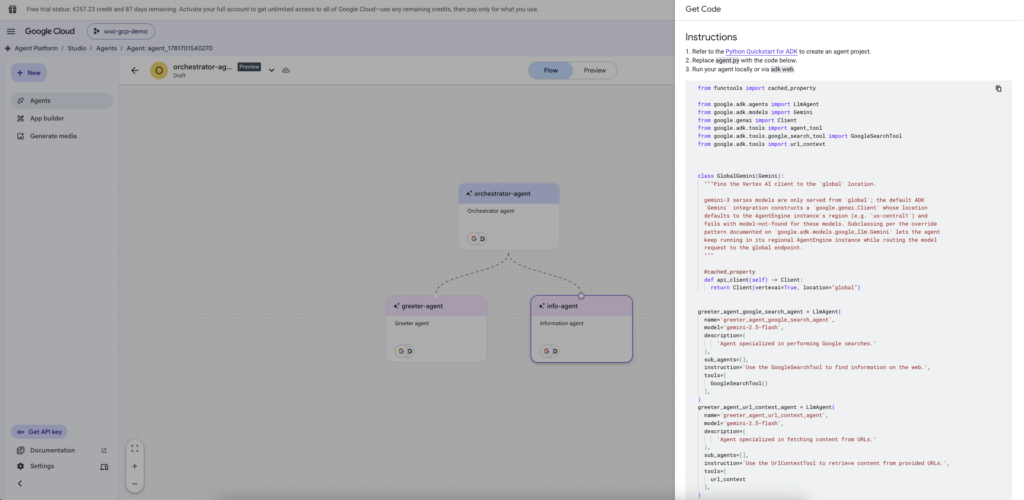
Within the Google Cloud environment, the visual builder interface an the left side displays a classic supervisor routing pattern.The central node, the orchestrator-agent, acts as the primary decision-maker. Instead of handling every query directly, it is designed to analyze the user’s intent and route the task to specialized sub-agents:
greeter-agent: Handling initial user interactions, pleasantries, and basic intake.info-agent: Retrieving specific data or performing targeted lookups.
On the right side of the screen, the platform generates the underlying Python code using the Google Agent Development Kit (ADK). This pane reveals how the visual graph translates into functional code:
- Model instantiation: The agents are built using the
LlmAgentclass, powered specifically by thegemini-2.5-flashmodel. - Tool equipping: The code defines specific tools for the sub-agents, like a
GoogleSearchTooland aurl_contexttool.
Below is the functional evolution of the snippet originally copied from the “Get Code” pane.
import os
import json
from fastapi import FastAPI, HTTPException, Request
from fastapi.responses import StreamingResponse
from functools import cached_property

from google.adk.agents import LlmAgent
from google.adk.models import Gemini
from google.genai import Client, types
from google.adk.tools import agent_tool
from google.adk.tools.google_search_tool import GoogleSearchTool
from google.adk.tools import url_context
from google.adk.runners import Runner
from google.adk.sessions import InMemorySessionService

app = FastAPI()

# --- 1. YOUR ADK AGENT DEFINITION ---
class GlobalGemini(Gemini):
    @cached_property
    def api_client(self) -> Client:
        return Client(vertexai=True, project="<YOUR-PROJECT-NAME>", location="global")

# Sub-Agent 1: The Greeter (Hyphen changed to underscore)
greeter_agent = LlmAgent(
    name='greeter_agent',
    model=GlobalGemini(model='gemini-3.5-flash'),
    description='Greeter agent',
    instruction='Greet the user warmly and handle all conversational pleasantries.',
)

# Sub-Agent 2: The Information Specialist (Hyphen changed to underscore)
info_agent = LlmAgent(
    name='info_agent',
    model=GlobalGemini(model='gemini-3.5-flash'),
    description='Information agent',
    instruction='Provide detailed, accurate information to answer the user queries.',
)

# Root Agent: The Orchestrator (Hyphen changed to underscore)
root_agent = LlmAgent(
    name='orchestrator_agent',
    model=GlobalGemini(model='gemini-3.5-flash'),
    description='Orchestrator agent',
    instruction='You are the central coordinator. Read the user\'s input and delegate the task to the appropriate sub-agent based on their specialty.',
    tools=[
        agent_tool.AgentTool(agent=greeter_agent),
        agent_tool.AgentTool(agent=info_agent),
        GoogleSearchTool(),
        url_context
    ],
)

# --- 2. ADK RUNNER SETUP ---
session_service = InMemorySessionService()
runner = Runner(
    app_name="watsonx_proxy",
    agent=root_agent,
    session_service=session_service
)

@app.post("/chat/completions")
async def chat_translator(request: Request):
    try:
        body = await request.json()
        messages = body.get("messages", [])
        is_stream = body.get("stream", False)
        user_message = messages[-1]["content"] if messages else ""

        session = await session_service.create_session(state={}, app_name="watsonx_proxy", user_id="watsonx_user")
        content = types.Content(role="user", parts=[types.Part.from_text(text=user_message)])

        events = runner.run_async(session_id=session.id, user_id=session.user_id, new_message=content)

        agent_reply = ""
        async for event in events:
            if hasattr(event, 'content') and event.content and event.content.parts:
                for part in event.content.parts:
                    if hasattr(part, 'text') and part.text:
                        agent_reply += part.text

        if not agent_reply:
            agent_reply = "No response generated by ADK."

        if is_stream:
            async def event_generator():
                chunk = {
                    "id": "chatcmpl-123",
                    "object": "chat.completion.chunk",
                    "model": "orchestrator_agent",
                    "choices": [{"index": 0, "delta": {"content": agent_reply}, "finish_reason": None}]
                }
                yield f"data: {json.dumps(chunk)}\n\n"

                finish_chunk = {
                    "id": "chatcmpl-123",
                    "object": "chat.completion.chunk",
                    "model": "orchestrator_agent",
                    "choices": [{"index": 0, "delta": {}, "finish_reason": "stop"}]
                }
                yield f"data: {json.dumps(finish_chunk)}\n\n"
                yield "data: [DONE]\n\n"

            return StreamingResponse(event_generator(), media_type="text/event-stream")

        else:
            return {
                "id": "chatcmpl-123",
                "object": "chat.completion",
                "model": "orchestrator_agent",
                "choices": [{
                    "index": 0,
                    "message": {"role": "assistant", "content": agent_reply},
                    "finish_reason": "stop"
                }]
            }

    except Exception as e:
        print(f"\n--- DEBUG ERROR: {str(e)} ---\n")
        raise HTTPException(status_code=500, detail=str(e))
Let’s have a look at the first part of the code:
- Targeting the model: The
GlobalGeminiclass ensures the global Vertex AI endpoints are targeted correctly, bypassing regional limitations for the Gemini 1.5 Flash models. - Sub-agent setup: The specialized
greeter_agentandinfo_agentare instantiated with their specific instructions. - Programmatic orchestration: The
root_agentserves as the primary decision-maker. Notice how it is equipped not just with standard tools likeGoogleSearchTool, but specifically withagent_tool(agent=greeter_agent)andagent_tool(agent=info_agent). This represents the programmatic implementation of the supervisor routing shown in the visual builder interface above.
The second part of the code is where the cross-cloud integration comes into play. Because IBM watsonx Orchestrate (in this case running on AWS) is built to communicate via widely recognized industry standards, it does not interface with the raw Google ADK natively.
- Standardized endpoint: An
@app.post("/chat/completions")route is exposed via FastAPI. It allows IBM watsonx Orchestrate to interact with the custom Google agent as if it were a standard, universally compatible LLM endpoint. - Session management: The ADK’s
InMemorySessionServiceandRunnerare initialized to manage state and maintain conversational context across subsequent API calls. - Payload reshaping: When IBM watsonx Orchestrate sends a request, the FastAPI route extracts the user’s message, passes it into the ADK
runner.run_async(), and then repackages the Vertex AI response to ensures the payload matches the expected schema.
But how do these separate clouds actually communicate in this specific setup?
To reduce architectural complexity for this demonstration, the entire integration is handled via FastAPI. By taking the core orchestration logic directly from Google Cloud’s Vertex AI agent and wrapping it in a lightweight FastAPI structure, an otherwise isolated cloud asset is transformed into a flexible, plug-and-play microservice.
To bridge the network gap between platforms for this demo, the service is exposed via an ngrok tunnel. This local tunneling bridge allows traffic to flow securely from the public internet directly to the locally running script, making the endpoint accessible to the cloud-hosted IBM watsonx Orchestrate environment.
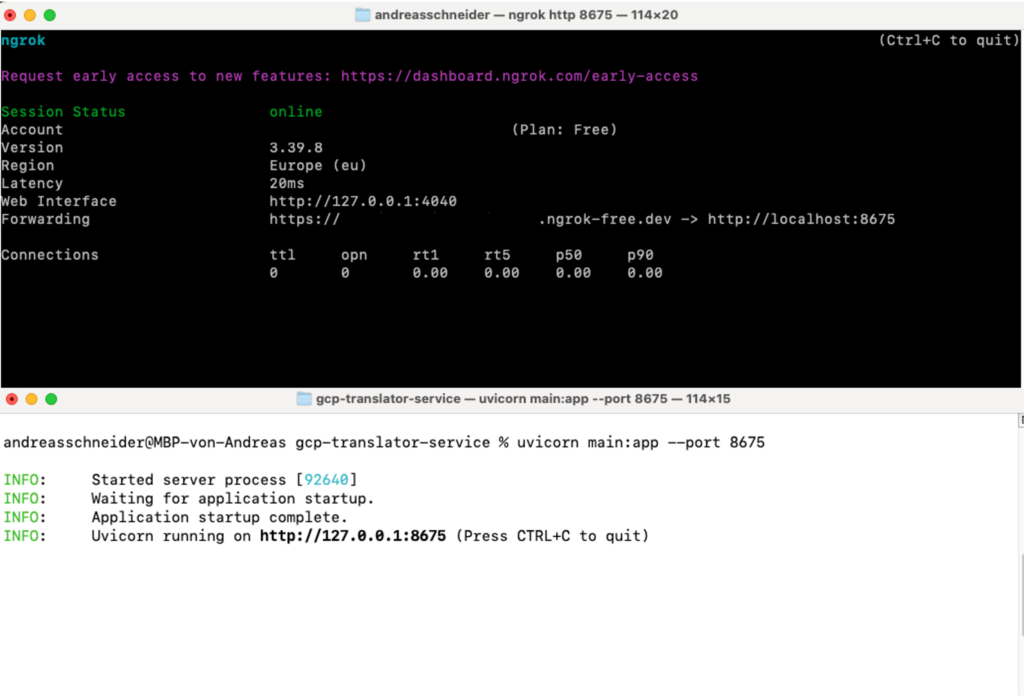
Architectural note: While executing this translation layer locally on my Mac and routing it via ngrok is efficient for rapid prototyping and local demos, an enterprise production deployment would strictly avoid local tunneling. Instead, this translation layer would be hosted natively within a secure, governed cloud environment – for instance, by deploying a dedicated Agent-to-Agent (A2A) integration stack – to ensure enterprise-grade security, scalability, and compliance.
In IBM watsonx Orchestrate this connection can be registered as an external agent.
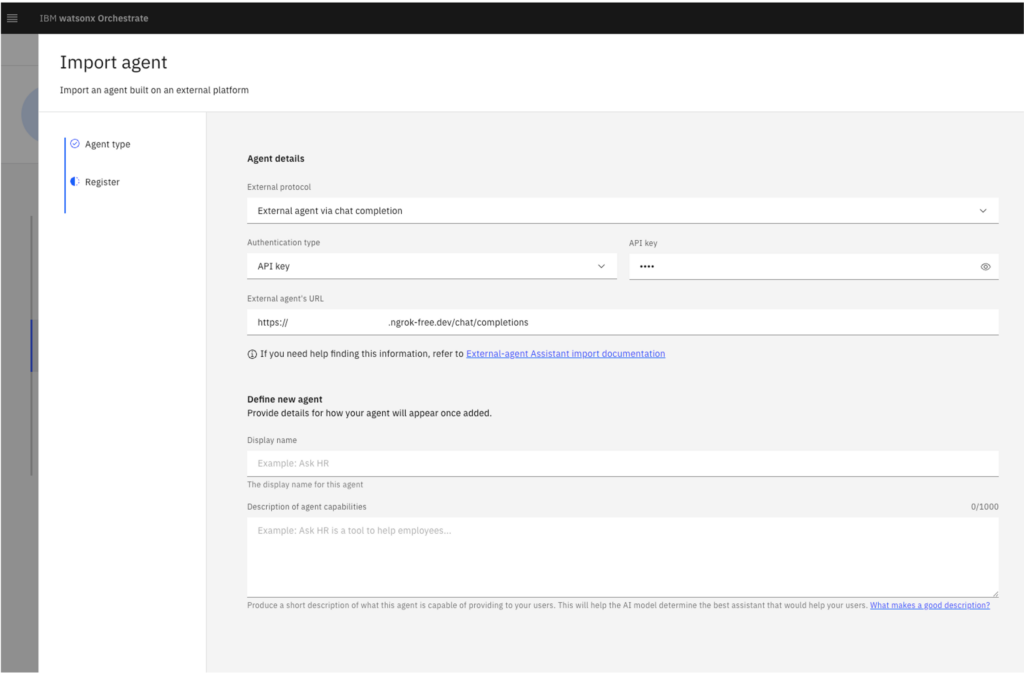
To make this cross-cloud orchestration function seamlessly in this demo setup, the integration relies on the standard Chat Completions API format. By standardizing the payload structure, IBM watsonx Orchestrate can pass conversational context, system instructions, and user queries to the external agent exactly as it expects, and then cleanly ingest the structured response back into the master workflow.
The Google Vertex AI agent can be connected as a collaborative agent in IBM watsonx Orchestrate.
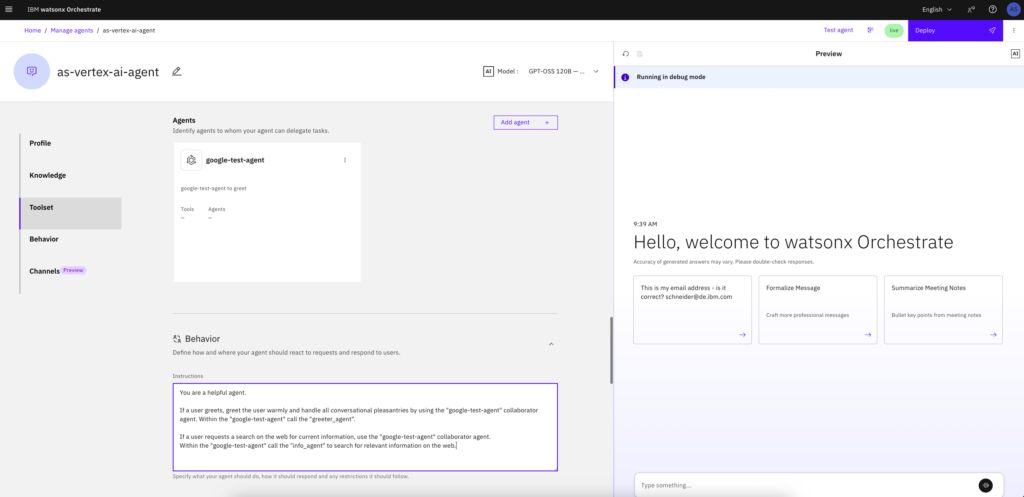
The agent can now be tested directly – for example, by asking it for current information about the FIFA World Cup: Who is playing today at the FIFA soccer world cup?
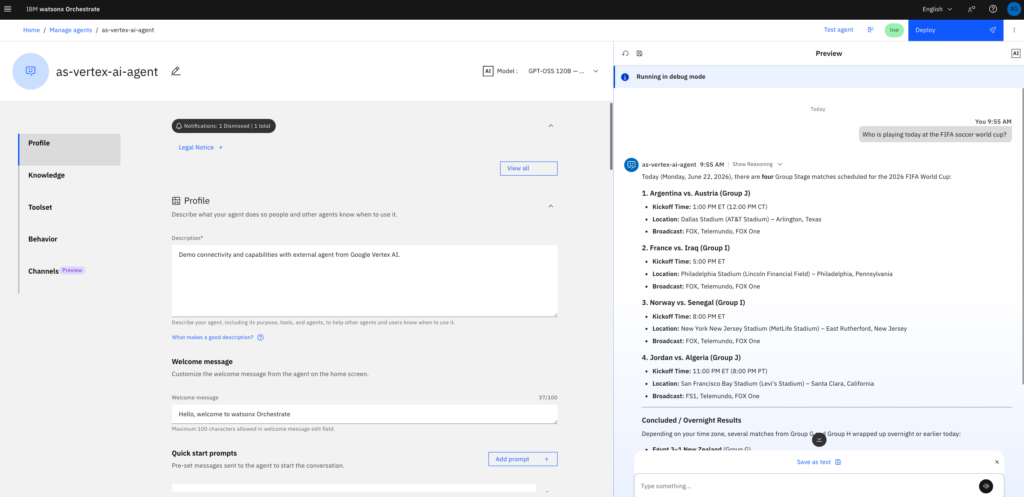
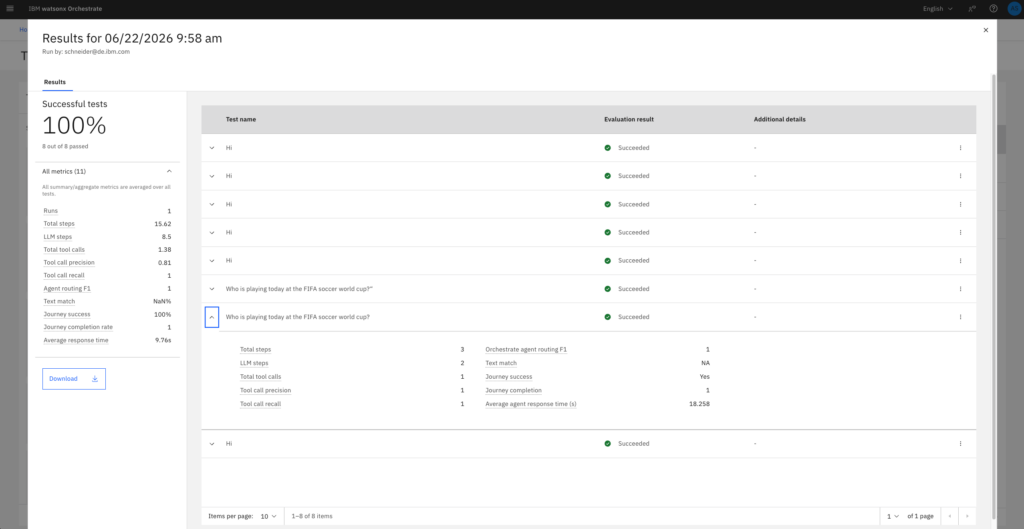
The reasoning shows that the orchestrator agent routes the request directly to the Google Vertex AI collaborator agent calling Tool: chat_with_collaborator_google_test_agent. For further validation, queries can be saved as dedicated test cases to continuously evaluate the agent’s performance. As shown in the image below, a suite of eight test cases was created, and the corresponding evaluation results are displayed.
For further validation, each conversation can be debugged – either directly within the preview or via the Agentic Control Plane. In this case, I would like to showcase the control plane and demonstrate how its debug mode can be leveraged to extract deeper insights into agent execution. The Control Plane continuously aggregates live data from all production agents. The following video highlights some of the key areas of today’s IBM watsonx Orchestrate control plane related to the Google Vertex AI agent.
From the Control Plane landing page, users can specifically access the Google Vertex AI agent to view detailed metrics. In addition to usage trends, user feedback, and evaluation data, the platform provides full access to the agent’s conversation history. From here, individual interactions can be opened and analyzed in depth using the debug mode.
Beyond a visual breakdown of the workflow – spanning user input, the orchestrator agent, and, in this case, the Google Vertex AI collaborative agent – detailed information can be retrieved for each specific node in the selected conversation. For example, clicking on the “Answer”-node within the collaborative agent node opens the node logs to display a granular breakdown of parameters like startTime, thread_id, run_id, and tenant_id and many more. Within these logs, the message content reveals which sub-agent (in this case the info-agent) was triggered and the content returned.
Furthermore, queries can be initiated directly within the control plane chat to gain a comprehensive overview of any specific agent’s execution.
Conclusion
This technical proof of concept is designed to demonstrate a potential synergy, illustrating how cross-platform agent integration can be achieved. It highlights how these disparate assets can then be monitored, managed, and governed from a single platform – in this case, via IBM watsonx Orchestrate control plane features.